GROVE FOR MAC · MANUAL · 2026-09-24
ひとつの音から、
次のループへ。One sound.
Your next loop.
Mac版の接続、録音、復帰まで。配布中の0.2.0 / build6(公証済みプレビュー)と、保存済みの検証ログに基づく操作マニュアルです。
VST3とモバイルLAN試聴は試作です。拡張なしのビルドには表示されません。実機での聴感・物理MIDIペダル・スマホ実機の遅延は未検証です。
このページは音を録音・再生せず、アプリも操作しません。CSS・言語切替はHTML内蔵、画面例のみ同梱の既存画像を参照します。
Connect, record and recover in the Mac edition. This manual describes the distributed 0.2.0 / build6 (notarized preview) and the verification logs available locally.
VST3 and mobile LAN listening are prototypes.They are absent from builds without extensions. Hardware listening, physical MIDI pedals and real-phone latency remain unverified.
This page does not record, play audio or control the app. Styles and language switching are embedded; screen examples use existing adjacent image files.
01 / インストール・動作条件01 / Install & requirements
- Apple Silicon Mac、macOS 13以降。現行プレビューはarm64用です。Intel版の提供を前提にしないでください。
- 入力1ch以上・出力2ch以上を持つ、入出力一体のCoreAudio機器が必要です。Babyfaceを優先候補にしますが、接続保証ではありません。必要なドライバーは機器メーカーの手順で準備してください。
- エンジンの受入範囲は8〜96 kHz、最大64入力/64出力。全構成の実機検証ではありません。44.1 kHz・60秒のPCMバッファだけで約339 MBを使用します。
- 稼働中の旧版で必要なループを保存し、終了します。未保存の演奏を上書きするために強制終了しないでください。
- 信頼できる配布元から入手したDMGがある場合は開き、GROVE.appをApplicationsへコピーします。ディスクイメージ内ではなく、コピーしたアプリを開きます。
- macOSが開くことを拒否した場合は配布元と署名・公証の状態を確認してください。セキュリティ機能を無効化する手順は推奨しません。
アプリの最小コンテンツサイズは1100×760です。手元の画面で全操作が見えるか確認してください。
- Apple Silicon Mac, macOS 13 or later. The current preview is arm64; do not assume an Intel build is available.
- A duplex CoreAudio device with at least one input and two outputs is required. Babyface is preferred in initial selection, not guaranteed compatible. Install any required drivers using the manufacturer's instructions.
- The engine accepts 8–96 kHz and up to 64 inputs/64 outputs; these are not all hardware-tested configurations. PCM buffers alone use about 339 MB at 44.1 kHz for 60 seconds.
- Save needed loops in the running older version and quit it. Do not force-quit an unsaved performance to replace the app.
- If you have a DMG from a trusted distributor, open it and copy GROVE.app to Applications. Launch the copied app, not the copy inside the disk image.
- If macOS refuses to open it, verify the source, signature and notarization status. Disabling macOS security protections is not recommended.
The app's minimum content size is 1100×760. Check that all controls fit on your display.
02 / 権限・音声機器を接続02 / Permissions & connection
- ヘッドホンやスピーカーの音量を下げ、機器・楽器・出力先を接続します。
- 右上の設定アイコン → 「サウンド & コントロール」→「音声機器」で選択。初回接続前に選びます。エンジン作成後は機器選択が固定されます。
- 「機器を接続」(設定内では「接続する」)を押し、macOSのマイク権限を許可します。外部インターフェイスからの録音もこの権限が必要です。拒否した場合はシステム設定 → プライバシーとセキュリティ → マイクでGROVEを許可してください。
- 「接続済み」、フッターの機器名・IN/OUT数・サンプルレートを確認。楽器を鳴らし、上段INPUTメーターで実際の入力を確かめます。
- 各カードの入力Chを選択します。初期値は②GuitarがCh3(入力が少ない機器では利用可能な最後のCh)、他はCh1。以前保存した機器別ルーティングがあれば優先されます。端子とChの対応は機器で確認してください。
- 設定の「出力」でステレオペアを選びます。全トラックのミックスがその1ペアへ出力されます。14出力なら1/2〜13/14で、トラック別の独立出力ではありません。OSの既定機器は変更しません。
ローカルネットワーク権限は任意。モバイルLAN試聴を使う場合だけ、OSに求められたら許可します。通常のローカル録音のためにLAN配信をONにする必要はありません。受信スマホのマイク権限は不要です。
- Lower your headphone/speaker volume, then connect the interface, instruments and outputs.
- Open the top-right settings icon → Sound & control → Audio device. Choose before the first connection; selection is locked once the engine exists.
- Press Connect and allow macOS microphone access. External-interface recording also requires this permission. If denied, enable GROVE in System Settings → Privacy & Security → Microphone.
- Check Connected and the device name, IN/OUT count and sample rate in the footer. Play the instrument and identify its channel on the top INPUT meters.
- Select each card's input channel. Initially ② Guitar uses Ch3 (the last available channel on devices with fewer inputs); all others use Ch1. Previously saved device routes take precedence. Verify the physical socket-to-channel mapping on your hardware.
- Choose a stereo Output pair in Settings. All tracks mix to this single pair, not separate per-track outputs. A 14-output device offers 1/2 through 13/14. GROVE does not change the OS default device.
Local Network permission is optional.Allow it if prompted by your OS only when using mobile LAN listening. Local recording does not require enabling LAN streaming. The receiving phone needs no microphone permission.
03 / 16一覧 / 4集中03 / All 16 / Focus 4
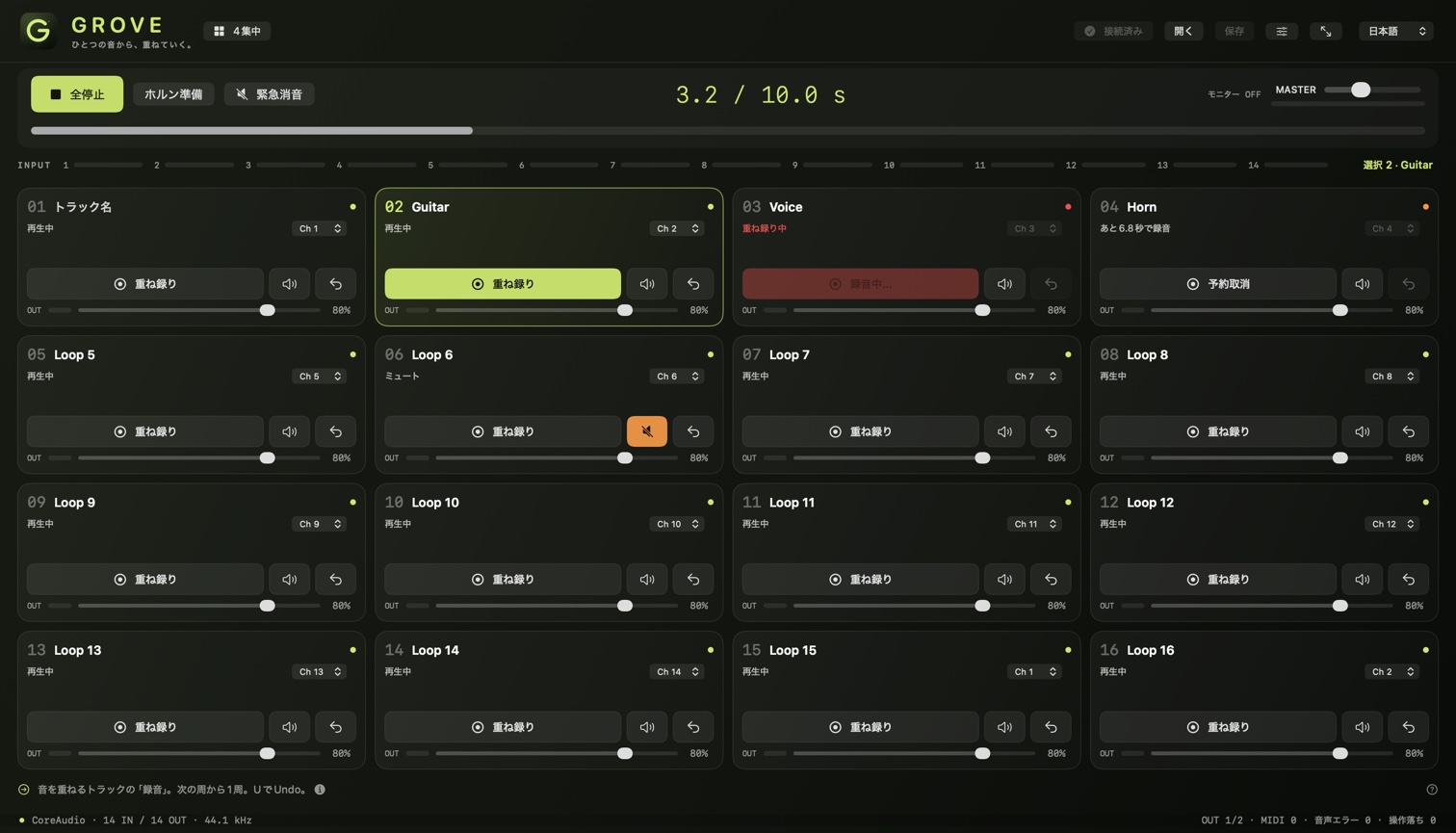
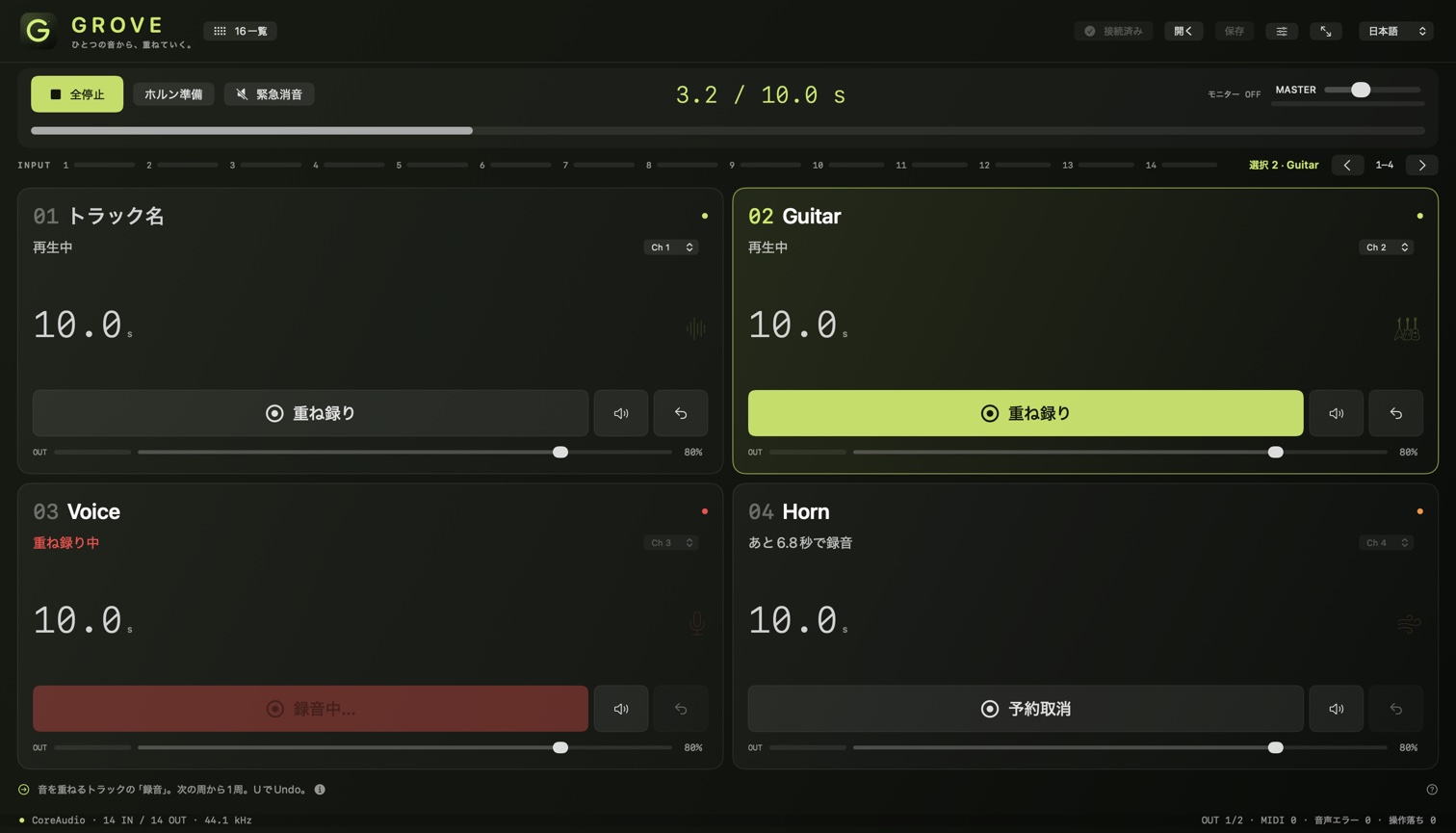
Mac版は常に16トラック。「4集中」は4本ずつ大きく表示するモードで、4トラックへの制限や残りの停止ではありません。「4集中」を押すと集中表示、「16一覧」を押すと一覧へ戻ります。ボタン名は切替先を示します。Fでも切替可能です。
カードの背景をクリックして選択。集中表示の左右ボタンで1–4 / 5–8 / 9–12 / 13–16のバンクを切替。選択移動にも表示が追従します。カードでは名前、入力、録音状態、Mute、Undo、音量を操作し、設定では選択トラックのPanと消去を扱います。上段INPUTは生入力、カードのOUTはループの音量・Mute反映後、MASTER下は最終出力のメーターです。
The Mac edition always has 16 tracks. Focus 4 enlarges four at a time; it neither limits the session to four nor stops hidden tracks. Press Focus 4 to enter focus view, then All 16 to return. Labels describe the destination view. F also toggles it.
Click a card's background to select it. Focus view arrows switch banks 1–4 / 5–8 / 9–12 / 13–16; the view also follows track selection. Cards contain names, inputs, recording state, mute, undo and gain. Settings contains pan and clear for the selected track. Top INPUT meters show live inputs; card OUT meters reflect loop gain/mute; the meter under MASTER shows final output.
04 / 最初のループ:0.5〜60秒04 / Your first loop: 0.5–60 seconds
- 接続後、入力Chとメーターを確認。TotalMixで直接聴く場合はGROVEの入力モニターをOFFにします。
- 例として②Guitarの「録音」を押して弾き始めます。録音はすぐに始まります。
- 0.5秒以上経過したら、同じボタン(表示は「ループ確定」)をもう一度押します。そこで長さが決まり、再生が続きます。0.5秒未満の確定操作は無視されます。60秒で自動確定します。
- MASTERと出力先を低い音量から確認。すべてのトラックがこの周期を共有します。BPMや拍数を先に指定する操作ではありません。
最初の録音中に別トラックを押しても、その録音を確定したり別録音を開始したりしません。途中で全停止すると未完成の最初のテイクは破棄されます。周期を作り直すには全録音を消去するか、最後の音声をUndoで除去して空にします。消去前に保存してください。
- After connecting, check the input channel and meters. Keep GROVE input monitoring OFF if listening directly through TotalMix.
- For example, press Record on ② Guitar and play. The first recording begins immediately.
- After at least 0.5 seconds, press the same button, now labeled Close loop. This sets the length and playback continues. Closing before 0.5 seconds is ignored; at 60 seconds it closes automatically.
- Check MASTER and your output at low volume. Every track shares this cycle; this is not a BPM or bar-count setup.
Pressing another track during the first recording neither closes it nor starts a second take. Stop all discards an unfinished first take. To establish a new cycle, clear all recorded tracks, or undo away the last remaining audio. Save before clearing.
05 / 録音・重ね録り・Undo05 / Recording, overdub & undo
- 空のトラック →「録音」:次の周期の頭から1周録音し、自動で確定します。停止中に押すと再生も開始し、先頭から録音します。
- 音のあるトラック →「重ね録り」:既存の録音を再生しながら入力を加算し、1周完了時に入れ替えます。録音完了を押す必要はありません。通常のトラック音量・Muteは録音入力そのものを止めません。
- 「予約取消」:録音開始前に同じボタンをもう一度押すと予約を取り消します。録音/重ね録りが始まったらカードの録音ボタンは無効です。
- Undo / Redo:カードの戻る矢印または選択してU。直前の完成した重ね録りを戻し、もう一度でやり直します。多段履歴ではありません。新しい重ね録りが始まると古いUndo履歴は失われます。
- 初回テイクのUndo:そのトラックの音を除去します。これはRedoできません。読み込み直後の音声にUndo履歴はありません。
- 途中で全停止:予約と未完成テイクを取り消します。途中の重ね録りは元の完成音声を保持します。位置は先頭へ戻り、次の再生は先頭からです。
- 消去:選択 → 設定 →「トラックを消去」→確認。「消去」はUndoできません。
- Empty track → Record: queues one cycle from the next boundary, then finishes automatically. If stopped, it also starts playback and records from the beginning.
- Recorded track → Overdub: plays existing audio while adding input into another buffer, swapping after a full cycle. No closing press is needed. Track gain/mute does not itself disable recording input.
- Cancel queue: press the same button before recording begins. Once the one-cycle take/overdub is underway, its card's record button is disabled.
- Undo / Redo: use the card's curved arrow or select it and press U. Toggle the last completed overdub off and on. This is not a multi-step history; starting another overdub discards the previous undo history.
- Undo a first take: removes that track's audio and cannot be redone. Loaded audio has no undo history.
- Stop all mid-take: cancels queues and unfinished takes. An interrupted overdub retains the earlier completed audio. Position resets to the beginning; Play starts there.
- Clear: select the track → Settings → Clear track → confirm. Clear cannot be undone.
06 / ホルン準備:もう1周の余白06 / Prepare horn: one extra cycle
「ホルン準備」は必ず④Horn(トラック4)を選択し、次の周期を1周休んでから、1周だけ録音/重ね録りをします。例えば8秒ループの途中で押すと、現在の周の残り時間+8秒待機し、その次の8秒を録音します。カードに残秒が表示され、開始前は「予約取消」で取り消せます。
入力はトラック4で設定したChです。EQや入力を自動で切り替えません。ループがまだない場合は待機せず、通常の最初の録音になります。先に周期を作ってから使ってください。
Prepare horn always selects track 4 (Horn), skips one extra cycle at the next boundary, then records or overdubs one cycle. In an eight-second loop, pressing midway waits for the remainder plus eight seconds, then records the following eight seconds. The card shows a countdown; Cancel queue cancels before it starts.
It uses track 4's assigned input. It does not switch EQ or input channels. Without an existing loop, it starts an ordinary first recording immediately, with no preparation wait. Establish a cycle first.
07 / 音量・モニター・緊急消音07 / Mix, monitoring & silence
各カードの音量は0〜100%、選択トラックのPanは設定で左右に調整します。MASTERは全体音量(初期35%)。Muteはループを消去せず聴こえなくします。上段INPUTはMute中も動くことがあります。
入力モニターは初期OFF。ONなら各未ミュートトラックが参照する入力を聴けます。同じ入力Chは重複加算しませんが、別トラックもその入力を使っている場合、1本のMuteだけではモニター音が止まらないことがあります。全停止だけでは入力モニターはOFFになりません。
TotalMixで直接聴くならGROVEの入力モニターはOFF。二重モニターやフィードバックを避けるため、機器側のルーティングも確認してください。出力のクリップ制限は耳や機器の安全保証ではありません。
緊急消音と戻し方
- 「緊急消音」または演奏画面でEscape。再生停止・未完成テイク/予約取消・入力モニターOFF・アプリ出力をラッチ消音します。LAN試聴も停止します。
- MASTERの設定値と完成ループは保持。「消音解除」だけでは再生しません。安全を確認して「消音解除」→「再生」。モニターとLANは必要なら手動で再開します。
GROVEの消音はTotalMixの直接音、他アプリ、外部ミキサーには効きません。機器側でも消音できるようにしてください。設定・ヘルプ・ファイルダイアログではEscapeは演奏用消音キーとして処理されません。割当済みのMIDI緊急消音は設定中も使用できますが、Learn中は割当入力として扱われます。無応答のアプリやクラッシュしたプラグインからの即時復帰を保証しません。
Each card has 0–100% gain; Settings adjusts the selected track's pan. MASTER controls the whole output (initially 35%). Mute hides loop audio without deleting it. INPUT meters may still move while muted.
Input monitoring starts OFF. When ON, it monitors inputs assigned to unmuted tracks, counting each source channel only once. Muting one track may not silence its live input if another unmuted track uses that source. Stop all alone does not turn monitoring OFF.
Leave GROVE input monitoring OFF when using TotalMix direct monitoring. Check hardware routing to avoid doubled monitoring and feedback. Output clipping limits do not guarantee hearing or equipment safety.
Emergency silence and release
- Press Silence or Escape on the performance screen. Playback stops; unfinished takes/queues are cancelled, input monitoring turns OFF and app output is latched silent. LAN listening stops too.
- MASTER's setting and completed loops are retained. Release silence alone does not play. After checking safety, press Release silence → Play. Re-enable monitoring and LAN manually if needed.
GROVE silence cannot mute TotalMix direct audio, other apps or external mixers. Keep a hardware mute available. In Settings, Help and file dialogs, Escape is not handled as the performance panic shortcut. A learned MIDI panic remains available in Settings, but while Learn is active incoming presses are used for learning. Immediate recovery from an unresponsive app or crashed plugin is not guaranteed.
08 / 保存と読み込み08 / Save & open
- 録音を完了するか予約を取り消し、「保存」 / ⌘S。保存先と名前を選びます。拡張子は
.grovenativeです。録音・予約中は保存できません。 - 保存処理は音声機器を一時停止し、ループ再生も停止します。同じフォルダの一時ファイルから置換する方式です。「保存しました」の通知を確認し、続けるなら再生を押します。LAN試聴は停止するので再開は手動です。
- 読み込みは先に機器を接続し、「開く」 / ⌘O。未保存の確認が出たら、必要に応じキャンセルして保存してください。読み込み成功後は停止状態、入力モニターOFF。再生で開始します。
- 保存する:16トラックのPCM、共通周期/サンプルレート、入力Ch、音量、Pan、Mute、トラック名、MASTER。
- 保存しない:Undo履歴、MIDI割当、音声機器/出力ペア、入力モニター、VST3の選択/状態/プリセット、LANペアリング。MIDIと機器別ルーティング等はこのMacのUserDefaultsに別保存されます。
- 新形式GROVEM02を保存し、旧GROVEM01も読めます。旧アプリは新形式を読めません。旧形式には名前とMASTERがありません。
- 同一サンプルレートと、保存された全入力Chが利用可能な機器構成が必要です。レート変換はしません。破損や不一致なら既存のループ内容を変更せず拒否しますが、読込の試行でもLANは停止します。
- 出力機器/ペアは現在の設定を保持します。読み込み成功時にはVST3を除去します。失敗時のFXは保持されます。
Web版の.groveと互換性はありません。これはセッション保存で、完成曲のWAV書出しではありません。名前はUTF-8で255バイト以内。自動保存やクラッシュ後の未保存音声復元を前提にせず、区切りごとに保存してください。
- Finish recording or cancel queued takes, then Save / ⌘S. Choose a name and location for the
.grovenativefile. Active or queued recording blocks saving. - Saving briefly stops the audio device and stops loop playback. A temporary file in the destination folder is used for replacement. Check the Saved notice; press Play to continue. LAN listening stops and requires a manual restart.
- To load, connect the audio device first, then Open / ⌘O. If warned about unsaved loops, cancel and save if needed. Successful loading leaves playback stopped and monitoring OFF. Press Play.
- Saved: all 16 tracks' PCM, shared cycle/sample rate, input channels, gain, pan, mute, track names and MASTER.
- Not saved: undo history, MIDI mappings, audio device/output pair, input monitoring, VST3 selection/state/presets or LAN pairing. MIDI mappings and device routing preferences are stored separately in this Mac's UserDefaults.
- Writes GROVEM02 and also reads older GROVEM01. Older apps cannot read the new format. The older format lacks names and MASTER.
- Requires the same sample rate and availability of every saved input channel. No sample-rate conversion. Corrupt or mismatched files are rejected without replacing existing loop content, but even a load attempt stops LAN listening.
- The current output device/pair is retained. Successful loading removes VST3; a failed load retains the FX.
Not compatible with the browser edition's .grove files. This is session saving, not a WAV mix export. Names must fit within 255 UTF-8 bytes. Do not assume autosave or recovery of unsaved audio after a crash; save at useful checkpoints.
09 / 切断・トラブルからの復帰09 / Recovery & troubleshooting
機器を抜いた / 音声が止まった
機器の消失やコールバック停止を検出すると再生停止・入力モニターOFFになり、完成ループはメモリに保持します。途中の録音と予約は取消、途中の重ね録りは元の完成音を保持します。検出には時間差があり、瞬時の無音化を保証する機能ではありません。
- アプリを終了せず「保存」で完成ループを救済します。切断後も保存可能です。
- 元の機器を同じサンプルレート/入力出力数で戻し「機器を接続」。自動的に別機器へ切り替えません。
- 別機器や別レートに変更するなら、先に保存してアプリを再起動。新しい構成では保存ファイルのレート・入力Ch条件を満たす必要があります。
音が出ない / 操作できない
- 「緊急消音中」なら解除→再生。MASTER=0、全トラックMute/音量0、空トラック、停止状態を確認。
- 入力メーターが動かないならマイク権限、入力Ch、ケーブル、機器ゲインを確認。録音済み音だけ聴こえる場合は、入力モニターOFFなら正常です。
- 出力メーターだけ動くなら出力ペア、TotalMixルーティング、ヘッドホン側を確認。
- フッターの「音声エラー」「操作落ち」が増えたら保存し、負荷と接続を確認。「操作キューが混雑」なら少し待って再操作し、結果を確認。
- FX処理失敗は継続消音です。停止してFXを除去または再読込。バイパスや消音解除だけでは失敗状態を解除しません。
- 保存できない場合は録音/予約、名前の長さ、保存先の空き容量・書込権限を確認。失敗通知を見落とさず、アプリを終了しないでください。
Unplugged interface / stopped audio
When device loss or stalled callbacks are detected, playback stops and monitoring turns OFF. Completed loops remain in memory. Unfinished recordings/queues are cancelled; an interrupted overdub retains its previous completed audio. Detection takes time; this is not a guarantee of instant muting.
- Do not quit. Save the completed loops; recovery saving remains available after disconnection.
- Reconnect the original device with the same sample rate and input/output counts, then press Connect. There is no automatic fallback to another device.
- To change device or rate, save first and restart the app. The new configuration must still meet the saved file's rate/channel requirements to load it.
No sound / unavailable controls
- If Silenced, release then play. Check MASTER=0, all tracks muted/at zero gain, empty tracks and stopped playback.
- No input meter activity: check microphone permission, input channel, cable and hardware gain. Hearing only recorded audio is normal with input monitoring OFF.
- Output meter activity but no sound: check output pair, TotalMix routing and headphones.
- If Audio errors or Dropped commands increase in the footer, save and check system load/connections. If Command queue full appears, wait and retry, then confirm the result.
- FX failure latches output silent. Stop and remove or reload the FX. Bypass or Release silence alone does not clear the FX failure.
- Cannot save: check active/queued recordings, name length, free space and destination write permissions. Check failure notices before quitting.
10 / キーボード10 / Keyboard
| キーKey | 操作Action |
|---|---|
| Space | 全再生 / 全停止(先頭へ戻る)Play / Stop all (resets position) |
| Escape | 緊急消音。解除キーではありませんSilence, not release |
| 1–9 | トラック1〜9の録音操作(選択だけではない)Record action on tracks 1–9, not just selection |
| Shift + 1–9 | トラック1〜9のMute切替Toggle mute on tracks 1–9 |
| ← / →, ↑ / ↓ | 選択を前後1本 / 4本移動(16本で循環)Move selection by 1 / 4 tracks, wrapping across 16 |
| R / M / U | 選択トラックの録音 / Mute / Undo・RedoRecord / Mute / Undo–Redo on selected track |
| F, ⌃⌘F | 16一覧・4集中切替 / フルスクリーン切替All 16–Focus 4 / full screen toggle |
| ⌘S / ⌘O | 保存 / 開くSave / Open |
名前の文字編集中は演奏キーを抑止しますが、演奏画面のEscape消音は有効です。設定・ヘルプ・ファイルダイアログ中は演奏キーを処理しません。トラック10〜16は選択してRかカードを使用。⌘Zはテキスト編集用で、ループのUndoはUです。
While editing a name, performance keys are suppressed but Escape silence remains active on the performance screen. Settings, Help and file dialogs block performance keys. For tracks 10–16, select then press R or use the card. ⌘Z is for text editing; loop undo is U.
11 / MIDIペダル11 / MIDI pedals
- 音声機器を接続し、設定 →「MIDIペダル設定」。CoreMIDI入力は約2秒ごとに再検出されます。
- 対象操作の「割当」を押してペダルを1回押します。NoteまたはCC、番号・Chが表示されます。「取消」でLearnを中断、×で割当解除。
- 押しっぱなしでは繰り返しません。Noteはvelocity>0、CCは64以上で押下。Note Off/velocity 0、CC 64未満で再度押せる状態になります。ペダルが離した信号も送る設定か確認してください。
- 同じ入力を別操作へ重複登録できません。元の割当を解除してから再登録します。割当はこのMacに保存され、セッションファイルには入りません。
割当可能:①リズム・②ギター・③歌・④ホルン準備、選択録音、前/次トラック、選択ミュート、Undo、全再生、全停止、緊急消音、消音解除。CoreMIDI機器UID全32bit・メッセージ種別・Ch・番号で識別します。旧形式の割当は再Learnが必要な場合があります。MIDIクロック同期や楽器プラグインへのMIDI送信ではありません。物理ペダルでの実演奏は未確認です。
- Connect the audio device, then Settings → MIDI pedal setup. CoreMIDI sources are refreshed about every two seconds.
- Press Learn for an action, then press the pedal once. Its Note/CC number and channel appear. Cancel stops learning; × removes a mapping.
- Holding does not repeat. Notes trigger at velocity >0; CC triggers at 64 or above. Note Off/velocity 0 or CC below 64 rearms the press. Ensure the pedal also sends a release signal.
- The same input cannot be assigned to two actions. Remove the original mapping before reassigning it. Mappings stay on this Mac, outside session files.
Available actions: Rhythm, Guitar, Voice, Prepare horn, Record selected, Previous/Next track, Mute selected, Undo, Play all, Stop all, Silence and Release silence. Identity includes the full 32-bit CoreMIDI device UID, message type, channel and number. Older mappings may need re-learning. This is not MIDI clock sync or MIDI delivery to instrument plugins. Live use with physical pedals remains unverified.
12 / VST3マスターFX・試作12 / VST3 master FX prototype
完全に信頼するローカルVST3だけを選んでください。プラグインはGROVEと同じプロセス内でネイティブコードを実行し、音声・ファイルにアクセスでき、アプリをクラッシュさせる可能性があります。他の開発者のプラグイン読込のためライブラリ検証を無効化する構成です。サンドボックス隔離や安全性の保証はありません。重要な録音を先に保存してください。
- 録音を完了し、予約は取消。再生を全停止します。読込・バイパス・除去はいずれも停止中かつ録音/予約なしの場合だけです。変更拒否のために録音を勝手に破棄することはありません。
- 設定 →「マスターVST3 · 試作プレビュー」→「ローカル.vst3を選択」。警告を確認して「選択へ進む」、ローカルディスクの
.vst3バンドルを選びます。自動スキャンではありません。 - 名前と報告遅延(サンプル)を確認して再生。停止後に「バイパス」または「除去」。FX変更は機器を一時停止するためLAN試聴も止まります。
- 1個のステレオマスターFXのみ。arm64実行コード、Float32、単一の音声エフェクトクラス、ステレオ入出力各1バス、イベントバスなしを要求します。AU、楽器、MIDI、サイドチェーン、複数FXチェーンには非対応。
- プラグイン初期パラメータのまま動作。GUI、パラメータ編集、プリセット選択、オートメーションはありません。テンポ同期や遅延補正を期待しないでください。
- プラグイン状態はセッションに保存されません。セッション読込成功時にはFXを除去。後で手動で選び直します。
- 読込失敗なら前のFXを保持します。処理エラーを検出すると最終出力を継続消音し、ステージと設定に警告。停止→除去/再読込で復旧します。ネイティブコードのクラッシュ自体を封じ込める機能ではありません。
Select only local VST3 plugins you fully trust. Native code runs inside GROVE's process, can access audio/files and may crash the app. Library validation is disabled to allow other developers' plugins. There is no sandbox isolation or safety guarantee. Save important recordings first.
- Finish recording, cancel queues and Stop all. Loading, bypassing and removing all require stopped playback with no active/queued recording. Refusing a change does not silently discard takes.
- Settings → Master VST3 · prototype preview → Choose local .vst3. Read the warning, choose Choose plugin, then select a
.vst3bundle on a local disk. There is no automatic scan. - Check its name and reported latency in samples, then Play. Stop before Bypass or Remove. FX changes temporarily stop the device, also stopping LAN listening.
- One stereo master effect only. Requires arm64 code, Float32, exactly one audio effect class, one stereo input/output bus each and no event buses. No AU, instruments, MIDI, sidechains or multi-effect chain.
- Runs with plugin initialization/default parameters. No plugin GUI, parameter editing, preset selection or automation. Do not expect tempo synchronization or latency compensation.
- Plugin state is not saved in sessions. Successful session loading removes the FX. Select it again manually later.
- A failed load retains the previous FX. A detected processing error latches final output silent with stage/settings warnings. Stop, then remove or reload. This does not contain native-code crashes.
13 / モバイルLAN試聴・試作13 / Mobile LAN listening prototype
信頼できる同一LANでのみ使用。音声と認証情報は暗号化されません。HTTPページと非暗号化WebSocketで最終ステレオPCMを送ります。高遅延の実験機能で、ステージ用・演奏用モニターではありません。実スマホでの試聴・遅延は未検証です。クラウド中継もBluetooth遅延保証もありません。
- Macと受信端末を信頼できる同一LANへ接続。GROVEの音声機器を接続し、緊急消音を解除。初期状態のLAN配信はOFFで、自動開始しません。
- 設定 →「モバイルLAN試聴 · 任意」。LAN IPv4を選びます。「更新」で再取得。VPN等を含む複数候補があれば、端末から到達できる信頼済みLANのアドレスを選びます。
- 「LAN配信」をONにし、警告を確認して「開始」。再生停止中に限る制約ではありませんが、音量を下げて準備してください。OSが求めた場合だけローカルネットワーク権限を許可します。
- 「ペアリングURLをコピー」で完全なURLを取得し、自分の受信端末へ安全に渡して開きます。URLには秘密のトークンが含まれます。公開投稿・スクリーンショット・共有ログに載せないでください。ポート転送や公衆LANで公開しないでください。
- 受信ページの「再生 / Play」をタップ(自動再生なし)。同時に受信できるのは1台。受信ページの言語は端末のブラウザ言語で自動選択され、Macの言語選択とは別です。
- 画面を開いたままロックせず試聴。受信側の「停止 / Stop」、ページ非表示・離脱、接続エラーで受信を停止します。停止後はMac側で再開始し、新しいURLをコピーして開き直してください。受信ページはURLのトークンをアドレス欄から除去するので、単なる再読込では再ペアリングできません。
- 終了時はMacの「LAN配信」をOFFにし、URLを無効化します。
自動停止:緊急消音、音声機器切断/停止、アプリ終了で停止。接続済み端末がいなくなったことを検出した場合も停止し、再開は手動です。保存・読込・FX変更でも機器停止を伴うため停止します。一方、通常の「全停止」だけではLAN配信自体は止まりません(入力モニター音などが流れる場合があります)。
受信はHTTPのためAudioWorkletのセキュアコンテキストを前提にできず、高遅延のScriptProcessor互換モードを使用します。受信側に既にバッファされた音の即時停止やネットワーク断時の無遅延消音を保証しません。つながらない場合はLAN/IP、端末間分離、OS権限、ファイアウォール、使用中の受信端末を確認し、Mac側でOFF→ONして新規ペアリングしてください。
Use only on the same trusted LAN. Audio and credentials are not encrypted. An HTTP page and unencrypted WebSocket deliver final stereo PCM. This is an experimental, high-latency listener, not a stage/performance monitor. Listening and latency on a real phone remain unverified. No cloud relay or Bluetooth latency guarantee.
- Connect Mac and receiver to the same trusted LAN. Connect GROVE's audio device and release emergency silence. LAN streaming is initially OFF and never auto-starts.
- Settings → Mobile LAN listening · optional. Select LAN IPv4; Refresh updates the list. If multiple interfaces including VPNs appear, choose a trusted LAN address reachable by your receiver.
- Enable LAN stream, read the warning and press Start. Starting is not restricted to stopped playback, but prepare at low volume. Allow Local Network permission only if your OS prompts for it.
- Use Copy pairing URL, transfer the full URL privately to your own receiver and open it. It contains a secret token. Never put it in public posts, screenshots or shared logs. Do not port-forward or expose this on a public network.
- Tap Play on the receiver (no autoplay). Only one streaming receiver is accepted at a time. Its language follows the browser's language, independently of the Mac app's language selection.
- Keep the page foreground and the screen unlocked. Stop, hiding/leaving the page, or connection errors stop reception. After stopping, restart on the Mac and copy/open the new URL. The receiver removes the token from the address bar, so a plain reload cannot re-pair.
- When finished, turn LAN stream OFF on the Mac to revoke the URL.
Automatic stop: panic, audio-device disconnect/stop and app shutdown stop the stream. Detection that the previously connected client has gone also stops it; restart manually. Save, load and FX changes stop the device and therefore the stream too. However, ordinary Stop all does not stop LAN streaming itself; monitored input may still be sent.
Plain HTTP cannot rely on AudioWorklet's secure-context requirement, so the receiver uses higher-latency ScriptProcessor compatibility mode. Immediate cancellation of already-buffered receiver audio or zero-delay muting on network loss is not guaranteed. If connection fails, check LAN/IP, client isolation, OS permissions, firewall and any existing receiver, then toggle the Mac stream OFF/ON and pair anew.
14 / 検証範囲・本番前チェック14 / Evidence & preflight checklist
2026-09-24に現行コードとnative/build/preview6/内の保存済みログ、および配布DMG(SHA-256 c9ccedfe…c304ec43)の受入検査(hdiutil検証・公証validate・Gatekeeper accepted・新規フォルダへのインストールと起動、33 interaction / 27 rehearsal / 20 layout)を照合しました。ソースに存在すること、テストで確認できたこと、実演奏での受入は別です。
interaction.log:個別PASS 33項目(末尾の集計行は1テストとして数えない)。拡張初期OFF、録音/予約中のFX拒否、警告等。音声機器なし。rehearsal.log:個別PASS 27項目。合成PCMによる録音→ホルン→重ね録り→Undo→消音→保存復元・切断救済。実マイク不使用。layout.log:日英×5画面サイズ×2表示の20構成PASS。fixtureのフレーム計測であり、本人による見やすさの受入ではありません。- 配布DMG受入:同一Macユーザーでの検査。hdiutil/stapler/spctl(Notarized Developer ID, accepted)、分離フォルダへインストールした実パッケージバイナリで確認。5秒後にプロセス生存・音声接続要求なし。別ユーザーでの検証・実音声入力・実スマホ遅延は未確認。
- 過去の
native/build/hardware-smoke.json:Babyface 14in/14out、44.1 kHz、1,207 callbacks、errors 0、dropped 0。出力ピーク0の接続確認であり、build6拡張や実楽器の聴感検証ではありません。 - READMEに音声29チェック、ADelay統合、障害注入、Mobileプロトタイプ検証の報告がありますが、この文書では対応する実行出力を直接確認できた結果とは区別します。特定サンプルの成功は任意のVST3や実スマホの動作保証にはなりません。
未確認:実スマホLAN試聴、実測往復遅延、幅広いVST3互換性、物理MIDIペダル、実楽器での通し演奏・聴感、長時間安定性、別ユーザー環境。このbuild6は公証済みプレビューであり、「超低遅延」「完全」「本番保証」とは記載しません。
演奏前の短いリハーサル
- 入力Chと出力ペアを実音で確認し、二重モニターを避ける。
- 短いループ→別トラック→重ね録り→Undo→停止/再生を試す。
- 緊急消音→解除→再生を試し、TotalMix側の消音も確認する。
- 保存→開く→再生を確認。元の音声をバックアップしてから行う。
- 試作FX/LANは通常のループ操作と分けて低音量で検証し、舞台の唯一のモニター/安全装置にしない。
On 2026-09-24 the current source was checked against saved logs under native/build/preview6/ and the distributed DMG (SHA-256 c9ccedfe…c304ec43), whose acceptance inspection covered hdiutil verification, notarization validate, Gatekeeper accepted, installation into a fresh folder and launch, with 33 interaction / 27 rehearsal / 20 layout checks. Implemented behavior, automated verification and live-performance acceptance are distinct.
interaction.log: 33 individual PASS checks, not counting the final summary as a test. Includes extensions initially OFF, refusal of FX changes during recording/queues and warnings. No audio device.rehearsal.log: 27 individual PASS checks. Synthetic PCM recording → horn → overdub → undo → silence → save/restore and disconnected recovery. No real microphone.layout.log: 20 passing configurations: two languages × five sizes × two views. Fixture frame measurements, not user acceptance of readability.- Distributed DMG acceptance: inspected by the same macOS user. hdiutil/stapler/spctl (Notarized Developer ID, accepted), verified on the packaged binary installed into an isolated folder. Process alive after 5 seconds with no audio connection request. A separate macOS user, real audio input and real-phone latency remain unverified.
- Earlier
native/build/hardware-smoke.json: Babyface 14in/14out, 44.1 kHz, 1,207 callbacks, zero errors/drops. Output peak was zero: connection evidence, not build6 extension or live-instrument listening verification. - README reports 29 audio checks, ADelay integration, fault injection and mobile prototype tests. This manual distinguishes those reports from execution output directly inspected here. A sample plugin's success cannot establish compatibility with arbitrary VST3s or real phones.
Unverified: real-phone LAN listening, measured round-trip latency, broad VST3 compatibility, physical MIDI pedals, end-to-end live instruments/listening quality, long-duration stability and separate-user environments. This build6 is a notarized preview; no ultra-low-latency, perfection or stage-readiness guarantee is made.
A short pre-performance rehearsal
- Verify physical inputs and output pair audibly; avoid doubled monitoring.
- Try a short loop → another track → overdub → undo → stop/play.
- Try Silence → Release silence → Play, and verify hardware/TotalMix muting too.
- Test Save → Open → Play after backing up the original audio.
- Test prototype FX/LAN separately at low volume; do not make either your only stage monitor or safety mechanism.